Practical Evaluation of a 10 Children’s Coloring Listing Mockup Set
Selling a children’s coloring book online is a visual-first endeavor. The customer cannot physically inspect the paper quality, test the binding, or flip through the pages. They rely entirely on the product listing images to decide whether the book meets their expectations for quality and engagement. For independent publishers using platforms like Amazon KDP or Etsy, generating those images is often the most technically awkward part of the launch process. A dedicated 10 Children’s Coloring Listing Mockup set directly addresses this workflow bottleneck. This article evaluates the practical strengths of this type of asset, its limitations, and how different types of creators can best leverage it for consistent, professional results.
Defining the 10-Piece Coloring Book Mockup
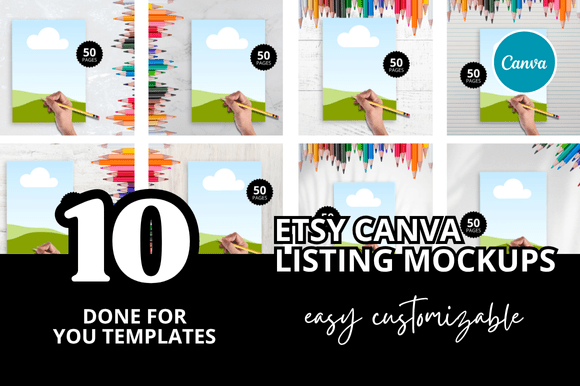
A digital mockup is a pre-rendered, layered scene—typically a Photoshop PSD file—designed to hold your artwork. The “10” in this context refers to a curated collection of distinct scenes. For a children’s coloring book, these scenes usually involve child-centric environments: a wooden desk scattered with crayons, a table with markers and stickers, a cozy carpet setting, or a flat lay with pencils and toys. The user inserts their book cover and interior spreads into designated “smart object” layers, and the software automatically applies realistic shadows, lighting, and perspective shifts.
The value of a 10-scene collection lies in its breadth. Amazon allows up to seven product images plus a video. A 10-piece set provides enough unique angles to fill an entire listing carousel, support A+ comparison charts, and supply social media assets without forcing the publisher to shoot new photography for every launch. This variety is essential for maintaining buyer interest and testing which thumbnail style generates the highest click-through rate.
Streamlined Production Workflow
Speed is a major factor in self-publishing sustainability. Staging a real photo shoot for a children’s coloring book requires sourcing props (age-appropriate crayons, colored pencils, erasers, toys), finding proper natural light or studio lighting, and shooting from multiple perspectives. This process can take hours per book. A well-constructed mockup set collapses that entire task into one software session. For a publisher launching several books per month, the time saved quickly amortizes the initial cost of the mockup bundle.
Consistent Brand Presentation
Building a recognizable brand across a backlist of titles requires visual consistency. If a buyer enjoys a specific book and looks for others by the same publisher, a uniform mockup style helps them identify related products. The 10 Children’s Coloring Listing Mockup enforces this consistency. Because the shadow depth, color temperature, focal length, and overall aesthetic are uniform across the set, every listing in your catalog projects a cohesive, professional identity.
Professional Visual Quality
The best mockup sets are constructed by professional photographers and digital artists with access to high-end equipment and lighting rigs. The resulting textures—wood grain, paper fibers, plastic marker caps—and the realistic bounce light are often difficult for a non-photographer to replicate with a smartphone. Using a professional mockup can elevate the perceived value of a $6.99 coloring book to the level of a mass-market retail publication, allowing the publisher to justify a higher price point and compete in a crowded niche.
Smart Object Logic and Organization
Not all mockup sets are created equal. The primary usability factor is the organization of the PSD file. Effective mockups use clearly named folders and layers, such as “Drop Cover Here,” “Drop Interior Spread Here,” and “Back Cover.” A disorganized file with hidden adjustment layers or incorrectly labeled smart objects can turn a five-minute task into a frustrating editing session. Before purchasing, look for samples of the layer structure or user reviews that mention ease of use.
Resolution and Output Quality
Amazon KDP requires images to be at least 1000 pixels on the longest side for the print edition, and ideally 2560 pixels for enhanced zoom functionality. A professional-grade mockup should output at 300 DPI with a minimum of 4000 pixels on the longest edge. Low-resolution mockups produce pixelation on retina displays and fail Amazon’s internal quality checks. The 10 Children’s Coloring Listing Mockup should consistently meet or exceed these technical requirements across all ten scenes.
Lighting Realism and Thematic Relevance
The lighting must match the product category. Children’s coloring books benefit from bright, soft, inviting light with natural color temperatures. Harsh shadows or overly dramatic studio lighting can make the book feel clinical or unapproachable. The best sets offer a mix of bright daylight scenes and soft ambient indoor shots, giving the publisher flexibility to match different interior art styles. Scenes with realistic crayon shadows and paper curl add a layer of authenticity that flat scans cannot provide.
Amazon KDP Listing Optimization
Amazon’s algorithm heavily weights click-through rate (CTR) in the search results. A flat cover scan on a white background is fast to produce but often blends in with competing listings. A mockup scene showing the coloring book sitting next to a jar of colored pencils on a child’s desk immediately signals the product’s purpose and creates an emotional connection with the parent purchasing it. This type of “in-context” thumbnail consistently outperforms flat images. The 10-set allows you to create a sequential visual story: the cover, an inside spread being colored, a view of the book from above, and a perspective shot of a child using it.
Etsy and Social Media Adaptability
On Etsy, lifestyle imagery is essential for conversion. Buyers need to visualize the product in a real-world setting. A mockup set allows print-on-demand sellers to list a physical product without holding inventory or staging a physical photo shoot. These same assets can be repurposed for Pinterest pins, Instagram feed posts, and Facebook ad creatives. The variation across ten scenes ensures that a brand’s social media presence does not look repetitive or template-driven.
Potential Limitations and Customization Needs
The primary limitation of digital mockups is their inherent “stock” feel. As more publishers use similar templates, buyers may recognize the generic background, which can reduce trust. To mitigate this, avoid heavy reliance on the mockup exactly as delivered. Invest a small amount of time adjusting the background color, adding a subtle texture overlay, or combining the mockup with a genuine unboxing photo. A hybrid approach—using a digital mockup for the cover shot and a real photo for a behind-the-scenes look—offers the best of both worlds: professional consistency and authentic human connection.
Who Benefits Most from This Asset
A single-book publisher with strong photography skills and excellent natural lighting may find a 10-piece mockup set redundant. However, for specific user profiles, this type of asset is a high-utility investment.
- Scaling KDP Publishers: If you launch multiple activity or coloring books per month, the time saved in batch image production is significant. The mockup set becomes a standardized tool in your launch checklist.
- Print-on-Demand Sellers: Etsy store owners focusing on low overhead and fast product iteration benefit directly from the ability to generate professional images without holding inventory.
- Creators Lacking Photography Equipment: A dedicated mockup set bypasses the need for a studio, professional lighting, or expensive camera gear. It provides a professional baseline with minimal technical skill required.
- Educational Content Creators: Sellers on platforms like Teachers Pay Teachers or Gumroad can use these mockups to create professional preview PDFs and cover images for their digital resources, increasing their perceived value.
Long-Term Value and Asset Reliability
A well-designed 10 Children’s Coloring Listing Mockup set is a reusable asset. It can be applied to every book in a series, across multiple series, and reused for years if the mockup style is timeless rather than trendy. Avoid sets that rely heavily on extreme filters, heavily stylized vintage overlays, or specific seasonal props, as these will limit your ability to scale into different genres.
Reliability also depends on file format. While Photoshop PSD remains the industry standard for mockup editing, some creators now use browser-based tools like Canva. If you do not own Photoshop, look for mockup sets that offer layered PNG files or Canva-compatible templates. This ensures the asset remains usable even if your software preferences change.
Practical Recommendations Before Purchase
- Evaluate the angles provided: A balanced set should include top-down flat lays for pin graphics, perspective shots for Amazon thumbnails, and close-up details to showcase paper quality. Avoid sets that rely entirely on one angle.
- Verify prop scale: Ensure the crayons, pencils, and markers are sized proportionally to an 8.5 by 11 inch or 8.5 by 8.5 inch book. Some mockups use miniature props that make the book appear larger than life, which can mislead buyers.
- Review the commercial license: Most mockup licenses permit unlimited commercial use for print-on-demand products, but confirm there are no quantity limits if you plan to print large batches or sell the mockup-generated images as part of a bundled service.
- Check user reviews for file quality: Look for feedback specifically mentioning shadow realism, smart object ease, and output resolution. These comments provide the most accurate picture of the product’s actual utility.
The 10 Children’s Coloring Listing Mockup is best understood as a professional productivity tool. It does not replace the need for a well-structured interior, a compelling book description, or a strategic keyword strategy. However, it effectively bridges the gap between having a completed PDF and presenting it in a way that commands buyer attention and trust. For the serious self-publisher focused on efficiency and visual quality, this type of mockup collection functions as a standard business tool. It removes a significant friction point from the launch process, allowing you to concentrate on producing the engaging, high-value content that keeps customers coming back.