How Tablet Etsy Canva Mockup Workflows Transform Digital Product Listings
When you browse an Etsy shop that sells digital planners, journal templates, or printable art, the first thing you notice is often the listing image. A well-composed tablet mockup can make the difference between a casual scroll and a click that leads to a purchase. The combination of Tablet Etsy Canva Mockup tools has become the go-to workflow for thousands of sellers who want professional-looking product presentations without hiring a photographer or learning complex design software. This article walks through the practical side of creating these mockups, explores the different ways sellers use them, and highlights what makes them effective for real-world Etsy shops.
The Practical Workflow of Creating a Tablet Mockup for Etsy
At its core, a tablet mockup is simply a photograph or rendered image of a tablet device, with your product digitally placed onto the screen. The process usually begins in Canva, where you either upload a pre-made tablet template or use one of Canva's built-in mockup elements. The key is aligning your design—whether it's a daily planner page, a budgeting spreadsheet, or a habit tracker—within the tablet frame so it looks natural and realistic.
Many sellers start by searching for "tablet mockup" directly inside Canva's template library. Canva offers a range of free and pro mockup scenes: a tablet lying on a desk next to a coffee cup, held in someone's hand, or propped up against a stack of books. Once you choose a scene, you drag and drop your design into the placeholder screen area. Canva's smart resize and positioning tools make it easy to adjust the angle, perspective, and lighting so the product blends seamlessly into the image.
For sellers who want more variety, third-party mockup packs designed specifically for Etsy listings are widely available. These packs often include multiple angles, lighting conditions, and background options. You can import them into Canva and overlay your design using the same drag-and-drop approach. The workflow stays the same: upload the mockup, insert your product into the screen area, adjust as needed, and export the final image for your listing.
Why Sellers Prefer Canva for This Task
Canva's appeal lies in its accessibility. You do not need to know Photoshop layers, masking, or advanced rendering techniques. The platform handles perspective and shadow effects automatically in many of its mockup templates. This lowers the barrier for new Etsy sellers who want to launch a shop quickly with polished visuals. Additionally, Canva runs entirely in a browser, so there is no software to install and no need for a powerful computer. A reliable internet connection and a free Canva account are enough to get started.
Another practical advantage is the ability to create multiple variations of the same mockup with minimal effort. If you sell a digital planner in three color schemes, you can duplicate your Canva design, swap out the product image, and have three listing photos ready in minutes. This speed is valuable when you are testing different styles or preparing for seasonal promotions.
Different Types of Tablet Mockups and Their Etsy Applications
Not all tablet mockups serve the same purpose. The context of your product dictates which type of mockup will resonate most with potential buyers.
Flat Lay Mockups for Lifestyle Appeal
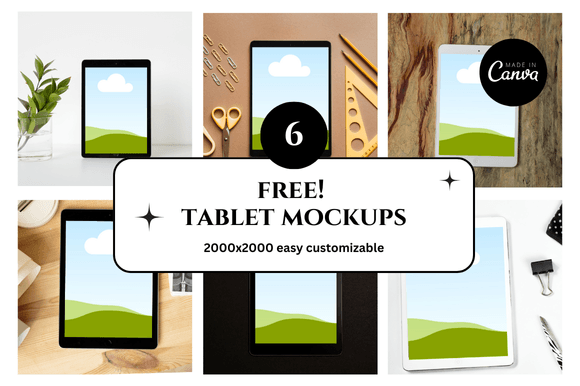
A flat lay mockup shows the tablet from a top-down or slightly angled perspective, surrounded by props like notebooks, pens, plants, or coffee mugs. This style works well for products that are part of a broader lifestyle—such as meal planning templates, goal-setting journals, or wellness trackers. The props help buyers imagine how the product fits into their daily routine. When you create this type of mockup using a Tablet Etsy Canva Mockup approach, the props are often included in the template itself. You simply replace the screen content with your own design.
Hand-Held Mockups for Realism
Mockups where a hand holds the tablet add a human element to the listing. This is particularly effective for products that are used on the go, such as travel itineraries, shopping lists, or study planners. The hand creates a sense of scale and usability. Buyers can see how the product looks at a natural viewing angle. In Canva, you can find hand-held mockup templates that already have realistic finger placement and shadowing. You just insert your design into the screen area.
Device-Only Mockups for Clean Product Focus
When the product itself is the star, a device-only mockup with a plain background or subtle gradient keeps the focus on the screen content. This works best for highly visual products like digital art prints, sticker sheets, or custom wallpapers. The absence of distractions helps the buyer evaluate the design details. These mockups are also easier to batch-produce because there are no props to match or coordinate.
Scene Mockups with Contextual Backgrounds
Some sellers go a step further and use scene mockups that place the tablet in a specific environment—a cozy home office, a minimalist bedroom, or a sunny café table. These mockups tell a story and help the buyer connect emotionally with the product. For example, a digital study planner shown on a tablet next to a cup of tea and a stack of textbooks immediately communicates its intended use. Scene mockups require more effort to set up initially, but they often lead to higher conversion rates because they paint a complete picture of the product's value.
Characteristics That Make a Tablet Mockup Effective for Etsy
Creating a mockup is one thing, but making it effective for conversion is another. Several characteristics separate a mediocre listing image from one that drives sales.
Accurate Perspective and Lighting
The most noticeable flaw in a poorly executed mockup is mismatched perspective or lighting. If your product image inside the tablet screen has a different angle or shadow direction than the surrounding scene, the whole image looks fake. High-quality Tablet Etsy Canva Mockup templates handle this automatically because the placeholder screen is already masked and shaded to match the scene. When using custom templates, it is worth taking a few extra minutes to check that your design aligns with the tablet's bezel and that the colors feel natural within the scene.
Clear Product Visibility
The purpose of the mockup is to show what the buyer will receive. If the screen content is too small, too busy, or obscured by glare or reflections, the listing fails its primary job. Choose mockup angles that maximize screen real estate. A slight tilt can add depth without hiding important details. Also, consider creating a second listing image that shows the product in full-screen mode without the tablet frame—this gives buyers a clean look at the design itself.
Consistent Brand Aesthetic
Buyers often browse multiple listings in a single shop visit. If every listing uses a different mockup style, the shop can feel disjointed. Establish a consistent aesthetic by using the same mockup style across your entire product line. This builds brand recognition and trust. Canva makes this easy because you can save your preferred mockup as a template and reuse it for every new product. Over time, your shop gains a cohesive look that signals professionalism.
Use Cases Where Tablet Mockups Excel
While digital planners are the most obvious product category for tablet mockups, the application is much broader.
Digital Planners and Organizers
This is the classic use case. Buyers want to see how the planner pages look on an actual tablet screen. A mockup shows the layout, the colors, and the interactive elements like checkboxes or tabs. It also helps the buyer understand the scale—whether the text is readable and whether the buttons are easy to tap.
Printable Wall Art and Posters
Sellers of printable wall art can use tablet mockups to show how a design looks when framed or displayed. The tablet acts as a stand-in for the final printed piece. This is especially useful for digital-only shops where the seller cannot photograph the actual printed product. A mockup with a tablet on a gallery wall or leaning against a shelf gives buyers a realistic preview of the art in a home setting.
Digital Stickers and Icon Packs
Sticker sheets and icon packs benefit from tablet mockups because the screen grid or layout is clearly visible. Buyers can see how the stickers are organized and how they might look when used in a note-taking app or on a digital planner page. A hand-held mockup is particularly effective here because it suggests the actual usage scenario.
Workbook and Course Materials
Educators and course creators who sell PDF workbooks, study guides, or worksheets on Etsy can use tablet mockups to show the material in a readable format. A tablet mockup conveys that the content is accessible on a device, which is a key selling point for digital products. It also reassures buyers that the layout and formatting are clean and professional.
Practical Considerations When Using Tablet Mockups
Working with Tablet Etsy Canva Mockup tools is straightforward, but a few considerations can save time and improve results.
Screen Resolution and Aspect Ratio
Your product image must match the aspect ratio of the tablet screen in the mockup. If you are designing a planner page for a 10-inch tablet with a 16:9 aspect ratio, but your mockup shows a 4:3 screen, the image will either stretch or get cropped. Check the mockup specifications before you start designing. Canva templates usually indicate the recommended dimensions for the screen area. Following these dimensions ensures a perfect fit.
File Size and Export Settings
Etsy listing images are displayed at a maximum width of 570 pixels in search results, but high-resolution images are still important for the zoom feature. Export your mockup at a resolution that balances quality and file size. Canva's PNG export at 300 DPI works well for most listings. JPEG with high quality is also acceptable and produces smaller files. Avoid exporting at very low quality, as compression artifacts can make the mockup look unprofessional.
Testing on Real Devices
If you are selling a product that will be used on a tablet, consider testing the mockup on your own device first. Open the design on a tablet and take a photo of it. Compare that photo to your Canva mockup. This exercise reveals any discrepancies in color, brightness, or scale that you might not notice on a computer screen. Adjust your mockup settings accordingly.
Strategic Advantages for Etsy Shop Owners
Using tablet mockups strategically can elevate an Etsy shop in ways that go beyond just looking good.
Reducing Returns and Negative Reviews
When a buyer sees exactly how a digital product looks on a tablet before purchasing, the number of mismatched expectations decreases. This leads to fewer requests for refunds or exchanges. Digital products are not returnable in the traditional sense, but a buyer who feels misled by a listing image may leave a negative review. Accurate mockups protect your shop's reputation.
Supporting A/B Testing of Listing Images
Etsy sellers often experiment with different listing photos to see which ones perform best. Because creating a mockup in Canva is fast, you can generate multiple versions of the same product in different scenes or with different props. Run each version as a listing photo for a week and track which one gets more clicks. This data helps you refine your visual strategy over time.
Scaling Your Shop Efficiently
If you plan to grow your Etsy shop to dozens or hundreds of products, you need a repeatable process. A standardized Tablet Etsy Canva Mockup workflow lets you add new products quickly without reinventing the visual presentation each time. Save your favorite mockup as a Canva template, and for each new product, simply duplicate the design and swap the screen content. This keeps your shop consistent and your workload manageable.
Common Pitfalls and How to Avoid Them
Even experienced sellers can fall into traps when creating tablet mockups. Being aware of these common issues helps you produce better images from the start.
Overstyled Props That Distract
Props can enhance a mockup, but too many of them, or props that are irrelevant to the product, can confuse the buyer. A tablet mockup for a budget spreadsheet does not need a candle, a vase of flowers, and a vintage typewriter. Keep props minimal and directly related to the product's use. If the product is a meal planner, a grocery list and a coffee mug are relevant. If it is a study planner, a pen and a notebook make sense. Everything else is noise.
Inconsistent Shadows and Reflections
One of the hardest things to get right in a mockup is the interaction between the tablet and the surface it rests on. Shadows should match the lighting direction of the scene. Reflections on the tablet screen should be subtle and natural. Many Canva mockup templates handle this automatically, but if you are using a custom background or adding your own props, pay attention to these details. A shadow that falls in the wrong direction breaks the illusion.
Using Low-Resolution Product Images
The product image you insert into the mockup must be high resolution. If you use a low-quality preview of your design, the mockup will look pixelated or blurred. Always export your product pages at the highest resolution practical. Even though Etsy compresses images, starting with a clean, high-resolution file gives the best final result.
Trends Shaping Tablet Mockups for Etsy in 2025
The landscape of digital product presentation continues to evolve. Several trends are currently influencing how sellers approach tablet mockups.
Animated and Video Mockups
Etsy now supports video in listing images. Sellers are starting to use short animated mockups that show a tablet screen transitioning between different pages of a digital planner or flicking through a sticker pack. Canva's video capabilities make it possible to create these animated mockups without advanced editing skills. A short looping video can capture attention in search results more effectively than a static image.
Inclusive and Diverse Mockup Scenes
There is growing demand for mockups that represent different skin tones, ages, and lifestyles. Canva's template library has expanded to include more diverse hand models and environmental contexts. Sellers who want to connect with a broad audience should choose mockups that reflect the diversity of their actual customers. This small choice can make a significant difference in how buyers perceive the shop.
Hyper-Realistic Renderings
Advancements in mockup rendering technology mean that even templates created in Canva are approaching photographic realism. Shadows, reflections, and texture details are becoming more sophisticated. This raises the baseline for what buyers expect. Sellers who invest in high-quality mockup templates—even if they are free or low-cost—will stand out compared to those using basic, flat images.
Final Practical Advice for Getting Started
If you are new to creating tablet mockups for your Etsy shop, start simple. Pick one mockup style that matches your product category and learn it well. Use Canva's built-in templates first—they are free, easy to use, and already optimized for perspective and lighting. As you grow comfortable, experiment with third-party mockup packs or even create your own scenes using photographs you take yourself.
Pay attention to the details that matter to buyers: clear screen content, natural lighting, and a consistent shop aesthetic. The Tablet Etsy Canva Mockup workflow is not about being the most creative designer on the platform. It is about presenting your digital products in a way that feels real, useful, and trustworthy. When you achieve that, your listing images do more than just look good—they help buyers make confident purchasing decisions.